


Maps, Navigation & Directions
4.0452.00 Reviews
App Specs
- Version
- 1.71
- Updated On
- License
- Free
- Downloads
- 5,000,000+
- Developer
- Universal Nav
- Categories
- Maps & Navigation
- Platform
- Android
Screenshots
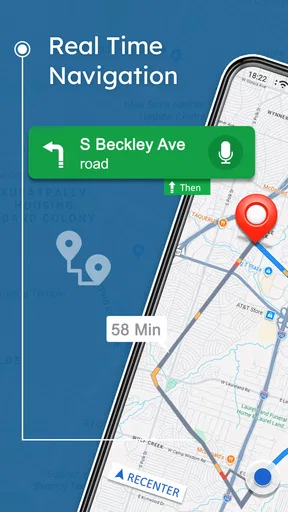
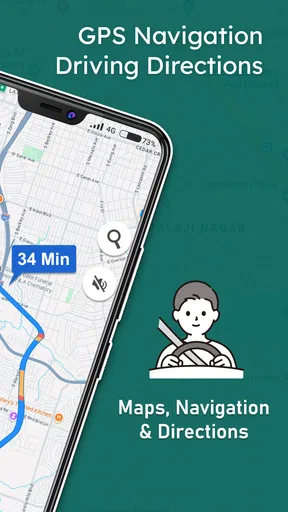
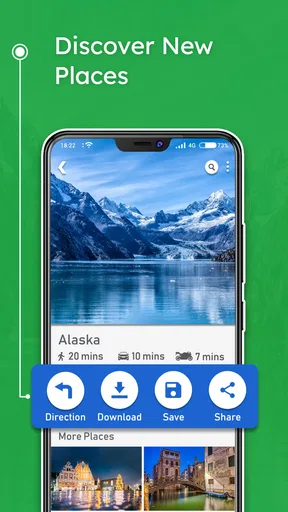
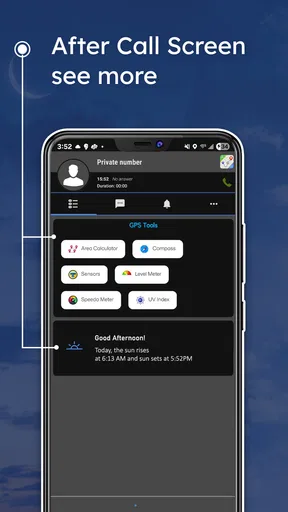

 Analysis by AppCompare
I judge a navigation app by how much it helps me stay oriented without demanding constant attention. Maps, Navigation & Directions is a free Maps & Navigation app from Universal Nav, and its focus on offline route planning gives it a useful role beyond everyday trips in areas with a reliable signal. It has an average rating of 4.0 from around 13,000 ratings and has been installed over 5 million times. Those figures suggest a substantial audience, though I would still decide based on whether its particular approach fits the way I travel.
Reading the map and following a route
The interface is clean and user-friendly. It follows a keep-it-simple approach, with the main functions arranged in a way that feels approachable if you are not especially comfortable with technology. That matters in a navigation app: when I am trying to work out where to turn, I want to find the route information quickly rather than spend time learning a complicated layout.
Turn-by-turn guidance is useful on unfamiliar streets because it can reduce the need to repeatedly study the map while moving. I would still treat the screen as a planning aid, not a reason to look down while driving. Before setting off, I would check the route and make sure I understand the next part of the journey; once moving, I would follow directions only when it is safe to do so.
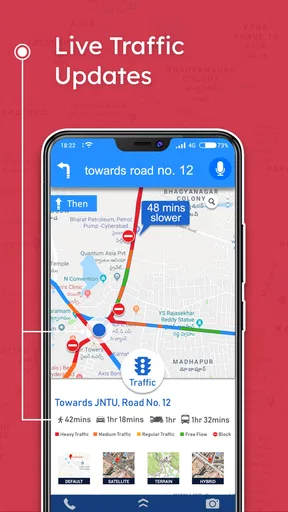
The app also offers live traffic information and alternative routes, which can help when a normal commute runs into congestion. Traffic suggestions are most valuable when there is time to consider a detour safely, rather than when I am already committed to a turn. I would compare a proposed change with the route I know and avoid making abrupt decisions just to chase a small apparent time saving.
Offline preparation makes the difference
Offline maps are the feature I would plan around most carefully. Before a trip where mobile service may be unreliable, I would download the relevant map while connected, then check that the destination and the surrounding roads are covered. This is a practical step for a rural drive, a holiday abroad, or a route through a patchy-signal area; discovering an offline gap only after losing connection is exactly the kind of avoidable stress that preparation can prevent.
Offline access should not be confused with every online feature working without a connection. A saved map can help with basic orientation when service drops, while live traffic information depends on current conditions being available. I would therefore use offline preparation as a backup for navigation, not as a promise that traffic updates or every search result will be current when the phone is disconnected.
Voice, search, and the way I use it
Voice search can be handy when typing is awkward, and the app’s search is intended to cover everyday destinations as well as practical stops such as coffee shops and public restrooms. In real use, I would enter or speak the destination before starting the journey, then check that the result is the correct place. Similar business names, a broad search area, or a destination on the wrong side of a large road can turn a convenient search into a needless detour.
Worth Reading Before You Choose

EA SPORTS FC Mobile 26 Is a Bigger Football Game, but It Takes Time

Flipboard Shows What News Apps Must Do Beyond the Feed

Switching to Android Auto Means Rethinking Your Driving Routine

Google Calendar Makes a Crowded Week Easier to Manage

Ludo King Makes the Most of the Minutes Between Plans

Baby Panda World Brings Quick Play to Modern Phones, but Its Game Library Feels Busy
A sensible workflow is to search for the exact destination, inspect the route before leaving, and save or download the needed map while the connection is available. For a multi-stop day, I would check each address separately rather than assume that a route built around one destination will automatically handle every later stop in the order I want. That small bit of planning is especially useful when timing matters or when I expect to be offline for part of the trip.
Traffic and calendar details in context
The calendar integration can connect appointments with locations and reminders, which may help me keep travel plans tied to the day’s schedule. I would use it for a day with several commitments, but I would still confirm the address and departure plan myself. A reminder is useful only if the appointment details are accurate, and it cannot account for every change in traffic or every unexpected delay.
Compared with the familiar general-purpose map apps many people already use, this one’s most distinctive practical appeal is the combination of route guidance with offline map preparation. A mainstream alternative may be a better fit if I rely heavily on a particular ecosystem, shared location tools, or local information I already know how to find there. I would not switch solely because another app also offers directions; I would test whether this app’s offline workflow suits the places I actually go.
Comfort across different needs and settings
For someone who finds dense menus frustrating, a straightforward layout can make starting a route less intimidating. Voice search may also reduce the effort of entering a destination, although it is not a substitute for checking the selected result. People who rely on small visual details, high contrast, screen readers, or specific input methods should try the app in their own setup before depending on it for an important trip. A simple interface is encouraging, but it does not by itself guarantee that every person can comfortably read or operate every screen.
There are also practical limits for users with different sensory or motor needs. A spoken instruction can be easier to follow than repeatedly looking at a display, while noisy surroundings may make voice interaction less convenient. Someone who has difficulty tapping small controls may prefer to enter a destination while stationary and avoid making changes mid-route. I would set up the trip before moving and, where possible, ask a passenger to handle adjustments rather than trying to use the phone while driving.
Walking and driving are not the same navigation problem. For a driver, turn guidance and traffic are central; for a pedestrian, the useful question is whether the route makes sense on foot and whether it is safe and comfortable to follow. I would inspect the route rather than assume that a suggested path suits a mobility device, avoids stairs, or provides accessible crossings. The app can help with orientation, but I would use local signs and my own judgement where the ground conditions matter.
Who should try it, and who may prefer another option
I would recommend giving it a try if you want a free navigation option, often travel through areas with inconsistent service, or like preparing a map before leaving. It is also worth considering if you want directions and traffic information in one place and find a simple starting point more appealing than a feature-heavy interface. Its Everyone content rating makes it broadly suitable from a content perspective, and the current version is 1.58 for devices running Android 8.0 or later.
I would be more cautious if your trips depend on highly specialised routing, detailed local discovery, or accessibility information that must be confirmed before departure. In those cases, I would compare the route with a second map source or consult local information directly. A second app can be a useful cross-check, especially for a long journey, a complicated interchange, or a destination where arriving at the correct entrance matters as much as reaching the address.
One everyday scenario shows where the app’s strengths and trade-offs meet: I have an appointment across town, but the route passes through an area where reception can be unreliable. I would check the address, review the proposed drive, download the map beforehand, and use the calendar connection as a reminder. If traffic changes the route, I would consider the alternative before acting; if service disappears, I would rely on the prepared map for orientation rather than expect live traffic to keep updating.
A measured recommendation
Universal Nav’s app has been available since May 23, 2019, and its 4.0 average rating reflects generally positive reception without making it the right choice for everyone. I see its strongest case in prepared, ordinary travel: getting directions, checking traffic while connected, and keeping a map available when connectivity may fail. Its weakest case is any journey where a user needs guaranteed specialised routing or where a map alone cannot answer important questions about the route’s accessibility and conditions.
My advice is to try it on a familiar, low-stakes trip first. Learn how you search, check a destination, and prepare an offline map before relying on it somewhere unfamiliar. If the display and controls work comfortably for you and the routes match your needs, it can be a handy companion. If you need richer local details or more dependable accessibility-specific planning, keep using a stronger alternative for those tasks and treat this as a useful extra rather than your only guide.
Right off the bat, the app's interface is clean and user-friendly. It's like they took a page out of the "keep it simple" playbook. Everything is laid out in a way that just makes sense. You can tell they put a lot of thought into the design, making sure users of all tech levels can jump right in.
Features Galore
Let’s dive into what makes Maps, Navigation & Directions a must-have on your phone. First up, the real-time GPS navigation. This feature is a game-changer, especially if you’re venturing into unfamiliar territory. The app provides turn-by-turn directions, so you can keep your eyes on the road and not on your phone.
Another standout feature is the live traffic updates. Seriously, this app is like having a personal traffic reporter in your pocket. It keeps you informed about traffic jams and suggests alternative routes. No more getting stuck in a gridlock on your way to brunch!
And let’s not forget the offline maps. Yes, you read that right. You can download maps in advance and use them even when you’re off the grid. This is a lifesaver when traveling abroad or heading into areas with spotty service.
User Experience
Using the app is a breeze. It’s quick, responsive, and so intuitive. I love how you can search for locations by voice command—perfect for those times when typing just isn’t an option. The search function is robust, finding everything from local coffee shops to public restrooms.
The app also integrates smoothly with other services. You can link it with your calendar to get reminders about appointments and locations, which is incredibly handy for keeping your day organized.
Final Thoughts
In a world where time is of the essence, Maps, Navigation & Directions makes getting from point A to point B a hassle-free experience. Whether you're a frequent traveler or just someone who wants to avoid traffic, this app is worth checking out.
So, if you haven’t already, give it a whirl. You'll wonder how you ever navigated before without it. Just download, open, and let it guide you on your next adventure. Trust me, you won't regret it!
Pros
- User-friendly interface enhances navigation.
- Real-time traffic updates improve route planning.
- Offline maps available for data savings.
- Voice-guided directions for hands-free use.
- Customizable routes to avoid tolls or highways.
Cons
- Battery consumption can be high on long trips.
- Occasional inaccuracies in lesser-known areas.
- Ads in the free version can be intrusive.
- Requires a strong GPS signal for accuracy.
- Some features locked behind a paywall.
FAQs for Maps, Navigation & Directions
What features does the Maps, Navigation & Directions app offer?
The Maps, Navigation & Directions app provides real-time GPS navigation, traffic updates, and route planning. It includes features like offline maps, voice-guided directions, and points of interest. Users can also find nearby services such as restaurants and gas stations, making it an essential tool for travelers and daily commuters.
Is an internet connection necessary for using the app?
While the app offers offline maps, an internet connection is required for real-time traffic updates and the most accurate route planning. Offline maps allow users to save data and access maps without a connection, but for live updates and dynamic rerouting, staying online is beneficial.
How accurate is the app’s traffic information?
The app provides highly accurate traffic information by integrating data from various sources, including user reports and official traffic feeds. It updates in real-time to offer users the best routes by avoiding congestion and road closures, helping to reduce travel time significantly.
What platforms is the app available on?
The Maps, Navigation & Directions app is available on both Android and iOS platforms. It can be downloaded from the Google Play Store for Android users and the Apple App Store for iOS users, ensuring a wide range of compatibility across mobile devices.
Does the app support multiple languages?
Yes, the app supports multiple languages to cater to a global audience. Users can select their preferred language in the app settings, making the navigation and instructions accessible and easy to understand for non-English speakers.


